DriveTrain
DriveTrain app icon: a white car with a learner and instructor, on a blue background.

Russian driving theory, readable in English.

Every question, every answer option, and every explanation exists in both Russian and English, and one tap switches between them without leaving the question. Read it in English to understand what's being asked, then in Russian to get used to the terminology.

Free to start on iPhone and iPad, iOS 16 or later. It's listed on the App Store as "Drive-Train". An Android version is in closed testing and isn't on Google Play yet.

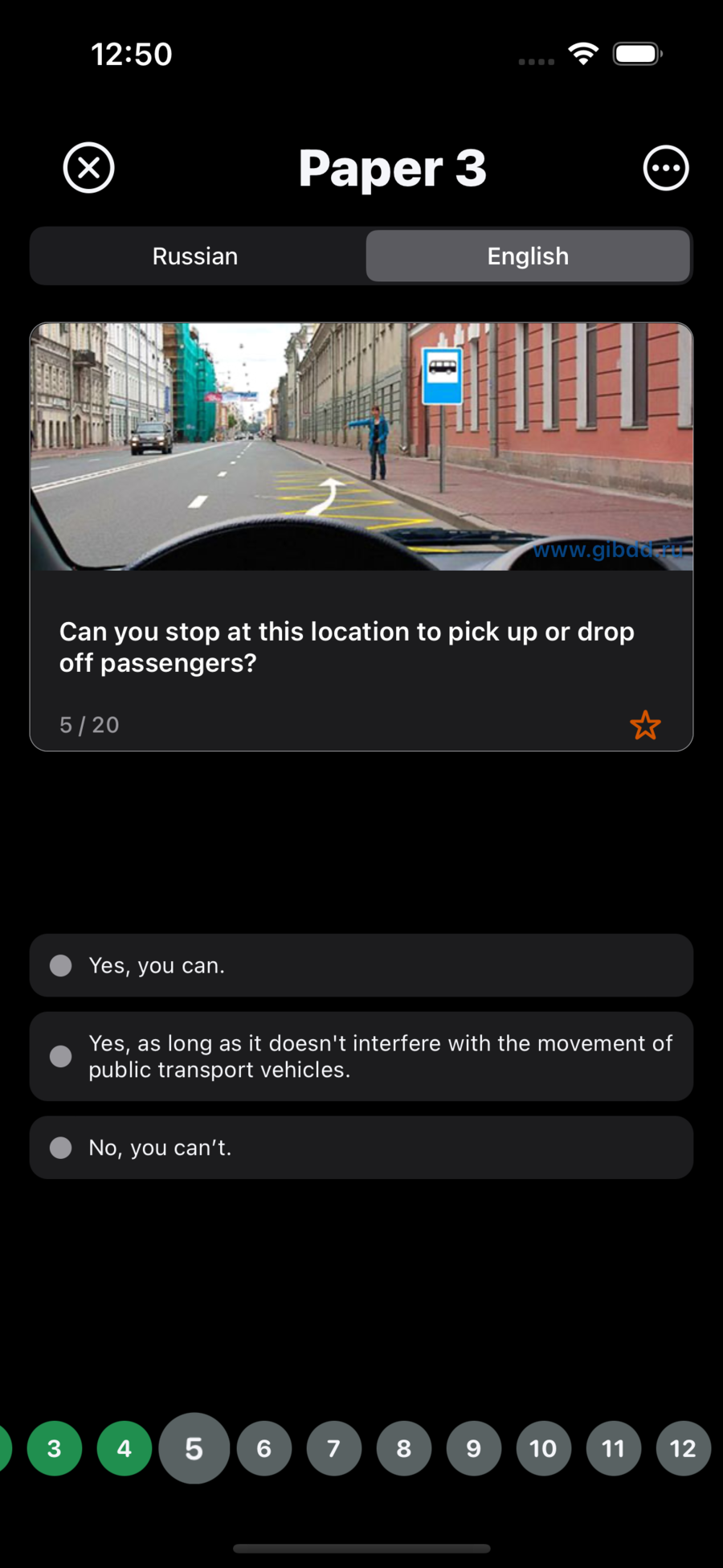
A DriveTrain question in English: a photograph of a city street with a bus-stop sign, the question "Can you stop at this location to pick up or drop off passengers?", three answer options, and a Russian / English toggle above.
800
questions, all in both languages
40 × 20
papers of twenty questions each
548
questions with a road photograph or diagram
800
written explanations, in both languages
0
accounts, sign-ups, or passwords
Offline
everything is installed with the app

Bilingual learning

Every question in both languages.

Each of the 800 questions is stored twice: the question text, every answer option and the explanation, in Russian and in English. Switching is instant, and nothing you've already answered is lost.

English · Paper 3 A DriveTrain question shown in English, with the answer options in English below a photograph of a Russian street.
Русский · Билет 8 A DriveTrain question shown in Russian, with the question text and all three answer options in Russian.
  • Answer options are translated one by one. Small differences between options often decide the answer, so all 2,504 of them exist in both languages.
  • The explanations are bilingual too. All 800 of them, in each language, so you can read why an answer was wrong.
  • The Russian wording is kept as it is. The plain English version is a tap away.
  • It works in every mode, including review and the timed mock exam.
What the toggle changes. The English / Русский control switches the question content: the text, the answer options and the explanation. The interface itself follows your device language, so Russian devices get a Russian interface and everything else gets English. There's no interface-language picker in the app, and the in-question toggle starts on English each time you open a quiz.

The question bank

800 questions in 40 papers.

Each paper holds exactly twenty questions. That's the ticket structure Russian theory practice is built around, and the reason the Russian interface calls a paper a билет. Questions cover traffic rules, road signs, right of way and road situations, and the explanations reference the relevant traffic-regulation paragraphs.

Two thirds of the questions come with a photograph or diagram of a real road situation, which is how sign-recognition and right-of-way questions are meant to be read.

A paper of 20 questions
Билет
Study
Учить
Practice
Практика
Mock test
Пробный тест
Statistics
Статистика

These are the words DriveTrain uses on a Russian device.

Studying

How a study session works.

  1. Pick a paper

    Tap any of the 40 tiles and the twenty questions open immediately. No setup screen, no configuration.

  2. Answer one question at a time

    Answers are single-select and lock as soon as you tap one. Your choice and the correct answer are both marked in green or red, with a check or a cross.

  3. Read the explanation

    A "?" button appears once you've answered. Every question has a written explanation, usually citing the specific regulation paragraph, in whichever language you're reading.

  4. Mistakes are collected for you

    Anything you get wrong joins the Review Mistakes list automatically, and leaves it the moment you answer it correctly. A live counter shows how many are outstanding.

  5. Bookmark questions

    Star any question from any mode. Bookmarked Questions is its own practice drill.

  6. Check your progress

    Papers turn green or red on the grid, and the statistics screen shows how much of the 800 you've mastered.

Papers and drills can be repeated as often as you like, and every answer is saved the instant you give it. Reopening a paper starts a fresh session rather than resuming a half-finished one.

Practice modes

Six ways to practice.

Mode What you get Access
Learn All 40 papers, 20 questions each, in any order, unlimited repeats Free
Review Mistakes Every question whose most recent answer was wrong, clearing itself as you improve Free
Bookmarked Questions Everything you have starred, from any mode Free
Top 40 Challenge 40 questions drawn at random from all 800
Full Practice All 800 questions, shuffled
Mock Exam A timed, scored exam simulation with a fresh random set each attempt

The free tier isn't a sample. All 800 questions, both languages, every explanation, every image, bookmarks, mistake review and all statistics are free and unlimited. A subscription adds the three paid modes above.

Timed mock exams.

The mock exam draws a fresh random set from the full bank, runs a countdown in the app bar, and scores you against a pass mark at the end. Answers are final once submitted, and any question left unanswered when the timer runs out counts as wrong. Afterwards you can review every question with your answer, the correct answer and the explanation, still switchable between English and Russian.

Retake it as often as you like. Each attempt is recorded, so the statistics screen shows exams taken, exams passed, your average score, and your best.

This is DriveTrain's own simulation. It's built for timed practice, not to reproduce the official examination. DriveTrain is an independent study app with no connection to any examining authority, and passing a mock exam here doesn't predict or guarantee a real result. Always confirm the current examination format and requirements with the official authority.

Progress

What DriveTrain tracks.

A question counts as mastered only if your most recent answer was correct, so a lucky guess you later get wrong stops counting toward your total.

  • Mastered, wrong, unattempted. The donut splits all 800 questions three ways and puts your completion percentage in the middle.
  • Accuracy across everything you've answered, alongside how many distinct questions you've attempted.
  • Per-paper status. Papers turn green or red on the grid once you've answered at least ten of their twenty questions.
  • Mock exam history. Attempts, passes, average score, and best score.
The DriveTrain statistics screen: a donut chart reading 69% complete, with correct, wrong, and unattempted answer counts listed below it.
The statistics screen, part-way through the 800.

Offline and privacy

Everything works offline.

No connection needed to study

All 800 questions, both languages, both sets of explanations, and all 548 images ship inside the app. Studying, mock exams and statistics all work with no internet connection. A connection is only needed to subscribe or restore a subscription.

No account, ever

No registration, no login, no email and no profile. Open the app and start studying.

Progress stays on your device

Your answers, bookmarks, sessions and statistics are stored locally. There's no DriveTrain account and no progress server. Anonymous usage analytics are collected to understand how the app is used. No name, email address, phone number or location is collected.

Settings → Reset App erases all progress, bookmarks and settings in one step, and uninstalling removes everything. Full details are in the privacy policy.

Pricing

Free to use, with three paid modes.

A subscription unlocks exactly three things: the Mock Exam, the Top 40 Challenge and Full Practice. Everything else stays free and unlimited.

Free

$0

All 40 papers and all 800 questions, both languages, every explanation and image, bookmarks, Review Mistakes, answer review, and all statistics. No time limit, no question limit, no attempt limit.

One week

$3.99

Unlimited access to Mock Exam, Top 40 Challenge, and Full Practice.

One month

$9.99

The same three modes, over a longer run-up to an exam.

One year

$99.99

The same three modes for a full year.

US App Store pricing. Prices in other countries are set by the store and shown in your local currency inside the app. Subscriptions are billed and managed by the App Store, and "Restore Purchases" recovers a subscription on a new device. DriveTrain contains no advertising.

Who DriveTrain is for.

  • English speakers preparing for the exam. The whole bank is readable in English, including the reasoning behind each answer.
  • Learners who read Russian but think in English. Read a question in English to understand it, then read the Russian formulation without leaving the screen.
  • People studying without a course. The 40-paper structure, automatic mistake capture and mastery statistics give you the structure an instructor would otherwise provide.
  • Anyone who needs the Russian terminology. It sits beside the English wording, question by question.

Platforms

Available on the App Store.

iPhone, iPad, Mac, and Apple Vision

DriveTrain is live on the App Store, free to download, with optional subscriptions. It's listed there as "Drive-Train".

Requires
iOS 16.0 or later
Devices
iPhone, iPad, Mac with an M1 chip or later, and Apple Vision
Version
1.0.5
Size
42.2 MB
Languages
English and Russian
Age rating
13+

Android

The Android app is built and running in a closed testing track. There's no public Google Play listing yet, so there's nothing to download from this page. When the listing goes live, it will be linked here.

Status
Closed testing, not published
Will require
Android 7.0 or later

Common questions

Is DriveTrain in English or Russian?

Both. Every question, every answer option, and every explanation exists in both languages, and you switch between them with one tap while looking at a question. The app's interface follows your device's language setting.

Are these the official exam questions?

DriveTrain is an independent study app. Its questions cover Russian traffic rules, road signs, and driving situations, and the explanations reference the relevant traffic-regulation paragraphs. DriveTrain is not affiliated with, endorsed by, or connected to any government body or examining authority.

How many questions are there?

800, in 40 papers of 20 questions each. 548 of them include a photograph or diagram of a road situation.

Does it work offline?

Yes. All 800 questions, both languages, all explanations, and all images are installed with the app. A connection is only needed to subscribe or restore a subscription.

Do I need an account?

No. There's no registration, no login and no email required.

Is DriveTrain free?

There is a substantial free tier: all 40 papers and all 800 questions, both languages, all explanations, bookmarks, mistake review, and all statistics — unlimited. A subscription adds three modes: Mock Exam, Top 40 Challenge, and Full Practice.

Does passing a mock exam mean I will pass the real one?

No. Nothing in the app can predict or guarantee an examination result. A good mock score means you know the material in this question bank; the official exam is set and marked by the examining authority.

Which platforms is it available on?

The App Store, for iPhone, iPad, Mac with an M1 chip or later, and Apple Vision, requiring iOS 16.0 or later. An Android version is in closed testing and not yet publicly released.

Read the full FAQ for progress tracking, subscriptions, language behavior and content corrections.

Download DriveTrain

All 800 questions are free to work through, in either language, with an explanation for every one.